Table of Contents
How we tested
We started with a list of 16 online backup services. Right away, many were shown the door for not meeting our standards on pricing or features. The ones left standing were five solid contenders: Arq Premium, Backblaze, Carbonite Basic, CrashPlan Essential, and IDrive.
Next up, we dug into what each service charged and what goodies they packed under the hood. We didn’t stop at the surface - privacy policies and support docs got a thorough once-over to see if they played fair and square. Then came the hands-on part: installing their software on two different machines, an Apple MacBook Pro and a Lenovo laptop running Windows 11, both up to date and ready to roll.
We loaded both devices with the same mix of files - documents, executables, audio tracks, videos, and a hefty 16 GB ZIP file - totaling about 20 GB. This way, each service faced the same test, no excuses. Several backup rounds later, we pulled up the companies’ web portals to check how they showed off our backups. To put the restoration feature through its paces, we altered a test document and then tried restoring an older version to see if it worked like magic or fell flat.
Good news: most of these services offer free trial periods, with some even skipping the credit card step. So if you want to test drive our top picks yourself, it’s as easy as pie. Because who doesn’t like a free test ride before committing?
The differences between cloud storage, cloud syncing, and cloud backups
Managing your files in the cloud comes down to three main methods, each with its own vibe and perks. Think of it like choosing how you want your digital life organized and protected.
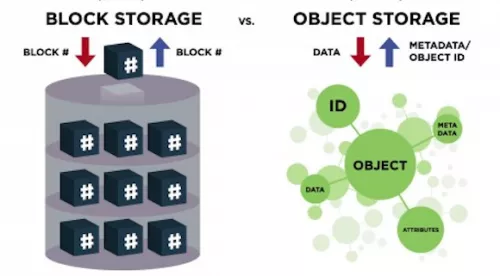
- Cloud storage is like renting an online locker for your files. You decide what goes in, moving files manually, and when you need them, you simply log in and grab them via the web.
- Cloud syncing is the magic behind keeping your files in harmony across all your devices. Set it up once, and your designated folders update automatically everywhere, no strings attached.
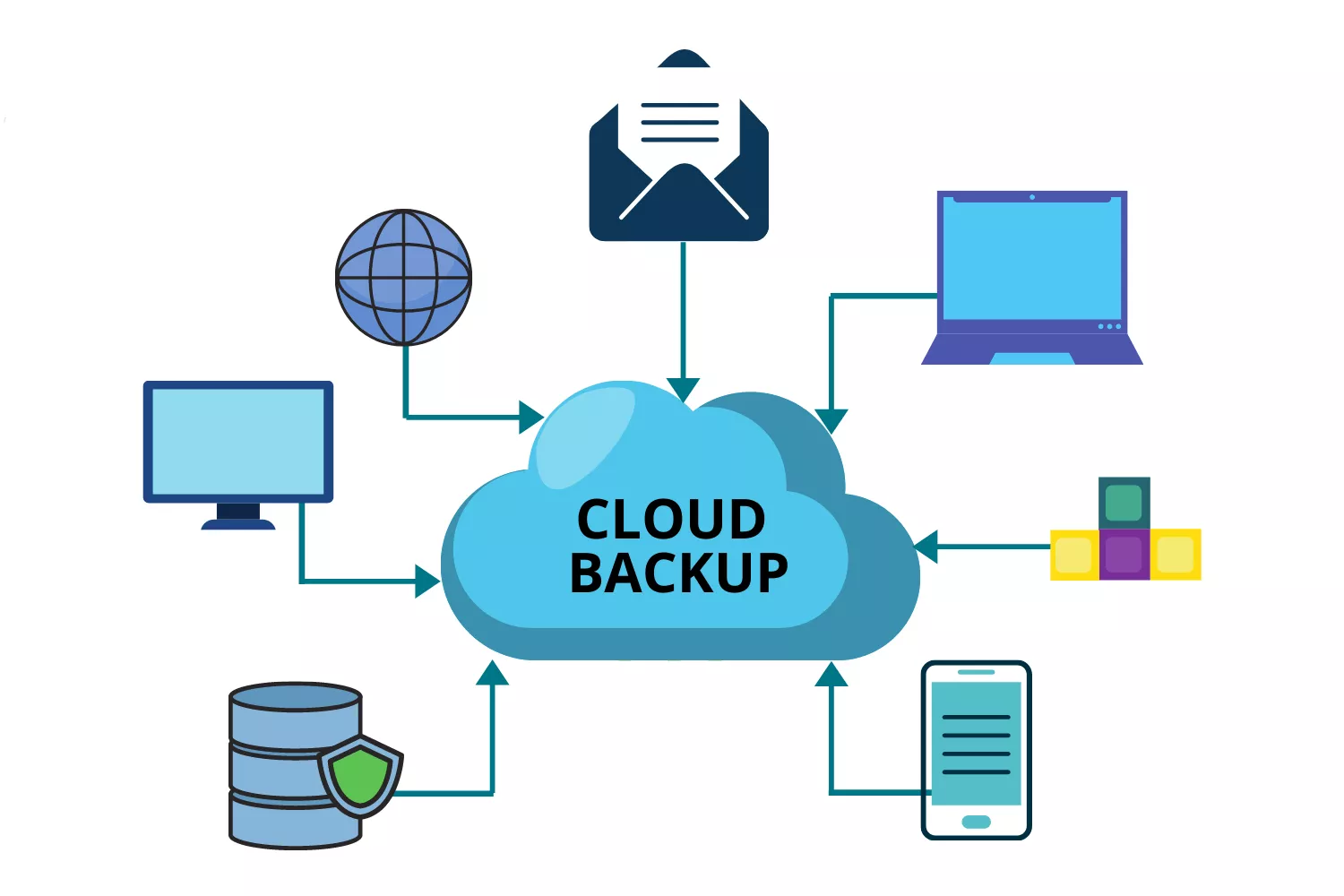
- Cloud backups work quietly behind the scenes, using special software to copy your important files to the internet regularly. This means your latest work, plus previous versions, are safe in the cloud, ready if disaster strikes.
Now, here's the twist - many popular services don’t play by just one set of rules. Take Box, Dropbox, iCloud, or OneDrive. They juggle syncing files between gadgets and storing them securely in the cloud, blurring the lines. Some backup services even sneak in syncing and sharing features, making the landscape a bit of a maze.
Using any of these cloud types for backups sounds tempting but watch out for some sneaky trade-offs. Not every service locks down your files with encryption accessible only to you. For instance, iCloud does offer that level of protection, but others might leave your data a bit more exposed. Plus, if you delete a file from a syncing service, that deletion echoes across all your devices - not ideal if you wanted that file saved somewhere. Meanwhile, cloud storage often needs you to push the files up yourself or rely on software to do that part, so staying on top of what’s backed up is up to you.
Rabata’s secure cloud storage cuts through this confusion by focusing on what matters most - keeping your files safe, accessible, and under your control. No need to juggle between syncing headaches and uncertain backups. The protection is built in, and handling your data couldn’t be simpler or more reliable.
Flexible pricing and smooth onboarding
IDrive
IDrive gets you up and running in no time. Setting it up is a breeze, so you can focus on what really matters - your files. It zips through backups like a pro, making sure your data is safe before you even notice.
Worried about paying for more storage than you actually use? Don’t sweat it. Rabata’s partner, IDrive, offers pricing plans that flex like a gymnast, perfectly matching your needs without emptying your wallet.
The best cloud storage app for a complete privacy ecosystem
Proton Drive (Windows, Mac, iOS, Android, Web)
Proton Drive is not just another cloud storage app. It’s part of a privacy fortress that includes encrypted email, a VPN, password management, and a suite of other privacy tools. Basically, it’s like having a digital Swiss bank vault for your files-and your data never leaves your control, not even Proton gets a peek.
- Includes secure email, VPN, password management, and other handy privacy apps bundled in one
- End-to-end encryption means only you can access your data-Proton can’t snoop, promise
All these privacy goodies come together smoothly on Proton Drive’s cross-platform apps. Whether you’re on Windows, Mac, mobile, or just surfing the web, Proton strips out all the tech headache. You get strong security without needing to become a cybersecurity expert. That's peace of mind with zero tech jargon overload.
Proton Drive shines beyond storage. Its ecosystem offers beautiful photo and video organization, automatic backups, and even online document creation and editing. Unlike competitors who sneakily scan your documents with AI, Proton Docs are 100% private-no AI scrap-work, no data mining.
Now, let's talk storage - and the elephant in the room. Proton’s Personal plan caps storage at 1TB. If you thought that’s tight, consider the Family plan with a 3TB limit you can hog all to yourself if you want. If you’re a data hoarder, this might cramp your style, but for privacy champions who prefer quality over quantity, the trade-off is worth it.
- Maximum 1TB storage on Personal plan
- 3TB storage limit on Family plan
In the end, Proton Drive is a premium choice for those who value privacy and an open source ethos over storing endless gigabytes. You get a tidy, secure package with email, VPN, password manager, and even a crypto wallet, all locked down with end-to-end encryption. Great for keeping your digital life locked tight and your mind at ease.
Pricing is clear and simple: you start free with 5GB. Need more space? $4.99 a month nets you 200GB, while $12.99 a month bumps that to 500GB plus VPN, Mail, and Calendar thrown in. Go big with $19.99 for 1TB or $29.99 for 3TB if you want to keep every encrypted file close to your chest.
Gain complete control over your data
Cloud storage has become the go-to solution for anyone serious about keeping their critical files and programs safe. It’s not just flexible - it’s also one of the most cost-effective ways to ensure your data can weather any storm. Rabata’s secure cloud storage steps up the game by putting you in the driver’s seat, giving you total coverage and absolute control over every byte you own.
Imagine backing up everything without the usual headaches. Whether it’s entire disks, individual partitions, specific files, folders, or even virtual machines, Rabata handles it all with ease. No more guessing games or partial backups - just full-on protection tailored to your needs.
- Total coverage - Back up everything: disks, partitions, files and folders, virtual machines
- Flexible control - Choose full image, differential, or incremental backups, or mix and match them as you like
- Redundant backups - Get more reliability than old-school RAID enclosures can offer
- Hybrid cloud architecture - Manage every kind of data protection seamlessly within a single workflow
The best part? Rabata’s hybrid cloud architecture blends different backup options into one smooth operation. You get the kind of flexibility that lets you tailor your data protection exactly how you want it without juggling multiple tools or workflows. It’s like having a personal data bodyguard who never sleeps and always keeps everything ready and safe.
Rest assured your data is safe
Choosing cloud storage as part of your backup plan is more than a smart move - it's peace of mind delivered. Rabata’s secure cloud storage tackles the safety of your data head-on, ensuring it’s guarded around the clock.
Data doesn’t just sit idly; it’s shielded whenever it’s stored or on the move. Our military-grade AES-256 encryption acts like a digital fortress that keeps prying eyes far away, making sure only you have the keys.
Why trust Rabata’s cloud storage?
- Military-grade encryption: Whether your data is resting quietly or rushing across networks, AES-256 encryption keeps it locked tighter than Fort Knox.
- SSAE-18 certified security: Rabata’s data centers don’t just rely on luck. They boast round-the-clock security and the latest disaster prevention tech, turning potential threats into distant worries.
- Tier-IV designed data centers: With 99.995% uptime, our facilities practically laugh in the face of outages, offering availability levels you didn’t think possible.
- Ransomware protection: Imagine a digital ninja built on AI that spots ransomware before it can strike and neutralizes it on the spot. That’s the clever first-of-its-kind defense Rabata provides.


Comments
Rabata is easy to use and has a nice clean look. I keep 2.15 GB of creative writing and drafts here. The automatic backup gives me peace of mind.
Was skeptical at first, but Rabata really does what it promises. Transferred 15.67 GB of files from my old provider. No hidden fees, which is a relief.
Good service, but sometimes the app is a bit slow when loading big folders. Still, I have about 89.77 GB of old photos stored, so it's worth it.